Travel-Ready Bluetooth Controller + VR Kit (With Case)
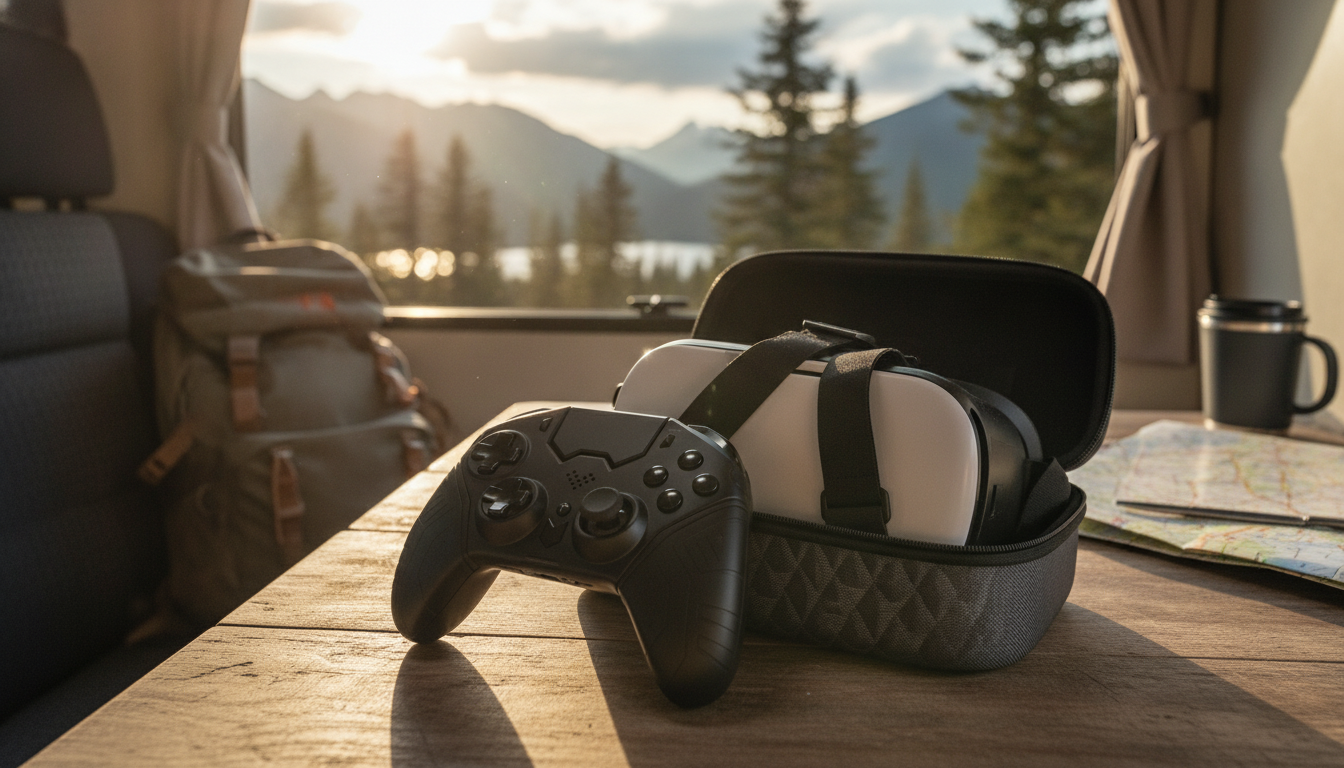
Wireless Bluetooth Game Controller with VR & Protective Carry Case
A compact controller-and-VR bundle that’s built for on-the-go gaming. The wireless Bluetooth controller is designed for quick pairing with compatible devices, while the included VR headset and protective carry case help keep everything organized for travel, storage, and daily use. Whether you’re squeezing in a few rounds on a break or packing for a weekend trip, a single kit that covers play, viewing, and storage makes it easier to keep your setup consistent.
What’s Included and Who It Fits Best
This bundle keeps the essentials together: a wireless Bluetooth game controller, a VR headset for phone-based viewing experiences, and a protective carry case for transport and storage. Instead of piecing together accessories one at a time, it’s a simple way to start (or tidy up) a mobile gaming kit.
- Bundle overview: wireless Bluetooth game controller + VR headset + protective carry case.
- Best for: casual gaming sessions, travel, and keeping accessories in one place.
- Good fit: users who want a simple controller that can work across multiple compatible devices without cables.
- Carry case advantage: helps reduce scuffs and keeps small accessories from getting lost.
If your controller tends to end up in a drawer, backpack, or passenger seat, a dedicated case can be the difference between “ready to play” and “where did that go?”
Key Features to Look For in Daily Use
Day-to-day satisfaction comes down to comfort, stability, and how quickly you can get connected. Bluetooth controllers are meant to remove friction—no cables, fewer constraints on where you sit, and easier pick-up-and-play sessions.
- Wireless freedom: Bluetooth connection reduces cable clutter and makes it easier to play from a comfortable distance.
- Controls and comfort: prioritize a shape that feels stable in hand and buttons that are easy to reach during longer sessions.
- Portability: a dedicated case helps protect the controller/VR gear during commutes and trips.
- Quick setup: choose devices that support standard Bluetooth pairing steps (enable Bluetooth, select device, confirm).
For the most consistent performance, keep your controller reasonably close to the device you’re playing on and avoid crowded wireless environments when possible (busy cafés, dense apartment Wi-Fi, or multiple active Bluetooth devices nearby).
Compatibility and Pairing Basics
Most Bluetooth controllers follow a familiar connection flow: you put the controller into pairing mode, then select it inside your phone, tablet, or computer’s Bluetooth menu. If you’re new to pairing accessories, the official device guides can help walk through the basics on iOS and Android: Apple Bluetooth accessory setup and Android Bluetooth connection steps.
Simple pairing checklist
- Open your device’s Bluetooth settings and make sure Bluetooth is turned on.
- Put the controller into pairing mode (often indicated by a blinking light).
- Select the controller from the available devices list and confirm pairing if prompted.
If pairing fails
- Restart Bluetooth on the device, power-cycle the controller, and try again closer to the device.
- Remove old/duplicate Bluetooth entries that may conflict, then re-pair from scratch.
- Keep firmware/software updated on the phone/tablet/PC for best reliability.
- Some games/apps require in-app controller enablement; check the app’s settings if inputs aren’t recognized after pairing.
For additional background on Bluetooth standards and how devices communicate, the Bluetooth SIG specifications are a helpful reference.
Controller + VR Bundle at a Glance
A bundle format simplifies shopping: one purchase covers controller play, VR viewing, and safe storage. It’s also practical for households where accessories get shared—or moved between rooms—because the case creates a “home base” for everything.
| Item | Purpose | Everyday benefit |
|---|---|---|
| Wireless Bluetooth game controller | Game input and navigation | Cable-free play and easier setup |
| VR headset | Hands-free viewing/VR-style experiences | More immersive viewing without holding the phone |
| Protective carry case | Storage and transport protection | Reduces scratches and keeps accessories together |
Using the Protective Carry Case Effectively
The case isn’t just for travel—it’s a daily organizer. Using it consistently can extend the life of your accessories by reducing dust, drops, and “bag damage” that happens when loose items bump together.
If you primarily play on a phone, pairing the kit with a protective phone case can be a smart add-on for everyday handling. For iPhone users, consider the Black Cat Reflective Laser Phone Case for iPhone to help keep your device protected while you’re on the move.
Care, Charging, and Simple Troubleshooting
Product Details and Where to Get It
- Product name: Wireless Bluetooth Game Controller with VR & Protective Carry Case
- Current availability: in stock
- Price: $40.82 (USD)
- Tip: Use the product page for the latest images, any updated bundle contents, and checkout options.
FAQ
How do you put a Bluetooth game controller into pairing mode?
Most controllers enter pairing mode by holding a dedicated Bluetooth/pair button or a specific button combination until an indicator light flashes. Once it’s flashing, open your device’s Bluetooth settings and select the controller from the available devices list.
Why is my controller connected but not working in a game?
Some games require controller support to be enabled in the game’s settings, and others only support certain controller types. Try checking the game’s input/controller settings and restarting the game after connecting to ensure it detects the controller.
What’s the benefit of a protective carry case for a controller and VR headset?
A protective case helps prevent scratches and reduces the risk of damage from bumps or drops. It also keeps accessories organized—like cables or small adapters—so your setup is easier to grab and go.













Leave a comment